
Your LLM Prompt Can Leave the Device. Your Customer’s Name Doesn’t.
An on-device PII airlock for LLM prompts: rules and a small NER model on ONNX Runtime Web and LiteRT, with measured results and a WebGPU int8 trap.
A support agent gets this ticket:
Please call Daniel Okafor back at +1 206 555 0143 about the refund for order 88412.
They paste it into an AI assistant and ask for a reply. Now a cloud model, its logs, and whoever can read those logs have a customer’s name and phone number. Multiply that by every ticket, email, and spreadsheet that gets pasted into a chat box, and you have one of the larger privacy leaks in a lot of companies.
The usual fix is a proxy on a server that scrubs prompts on the way out. It works, but the proxy now sees all the plaintext, so you’ve moved the problem rather than removed it. I’ve spent the last few years building privacy features that run in browsers and apps, and my instinct for this kind of problem is the opposite: deal with the personal data where it already is, on the user’s device, and send the cloud only what it needs.
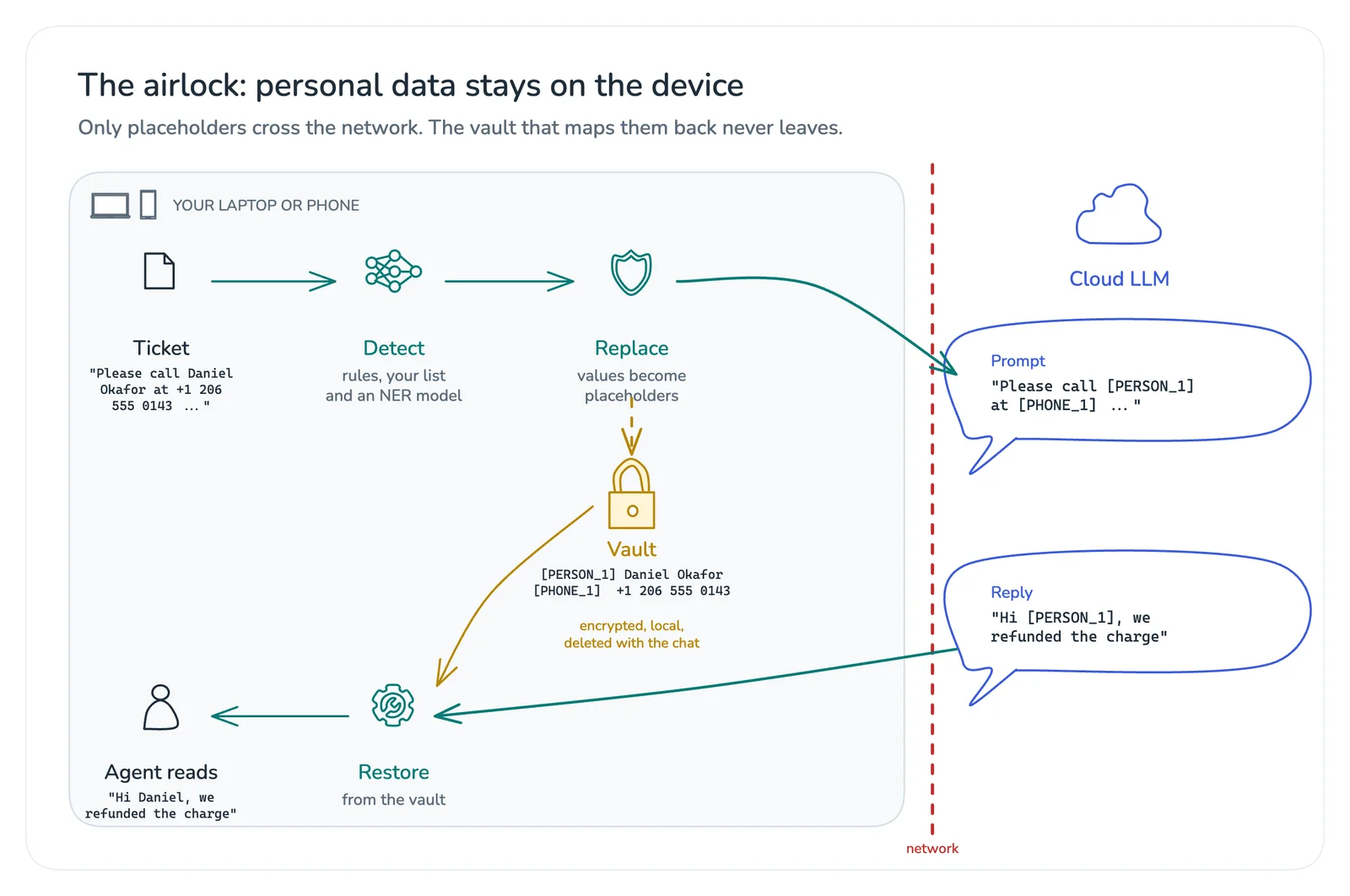
So in this article we’ll build an on-device PII airlock. Before a prompt leaves the device, it finds the personal data, replaces each value with a placeholder, and keeps the mapping locally. When the reply comes back, it puts the real values back in. The ticket above leaves the device as:
Please call [PERSON_1] back at [PHONE_1] about the refund for order 88412.We’ll build it twice from one model: in the browser with Microsoft’s ONNX Runtime Web, and for Android with Google’s LiteRT (the new name for TensorFlow Lite). Along the way I’ll share what I measured, including one quantization trap that silently breaks the model on WebGPU. All the code, tests, and measurements are on GitHub at OmShiv/pii-airlock.
What the airlock protects, and what it doesn’t
Before writing code, it’s worth being precise about the threat model, because privacy tools get oversold.
It protects against direct identifiers (names, emails, phone numbers, card numbers, IBANs, addresses, company names) reaching the LLM provider, its logs and retention, any training use, and anyone who breaches that provider later.
It doesn’t protect against a compromised device, quasi-identifiers (“the only cardiologist in a town of 800 people”), sensitive content that isn’t an identifier (a diagnosis), images and attachments, or a model inferring who someone is from context.
There’s a legal subtlety too. Replacing names with placeholders you can reverse is pseudonymization, not anonymization. Under the GDPR, pseudonymized data is still personal data. The airlock shrinks what you expose and to whom; it doesn’t make the rest of your privacy obligations go away. Running on the device is a design property, not a consent exemption.
Three detectors, one decision
No single technique finds all personal data well, so the airlock combines three.
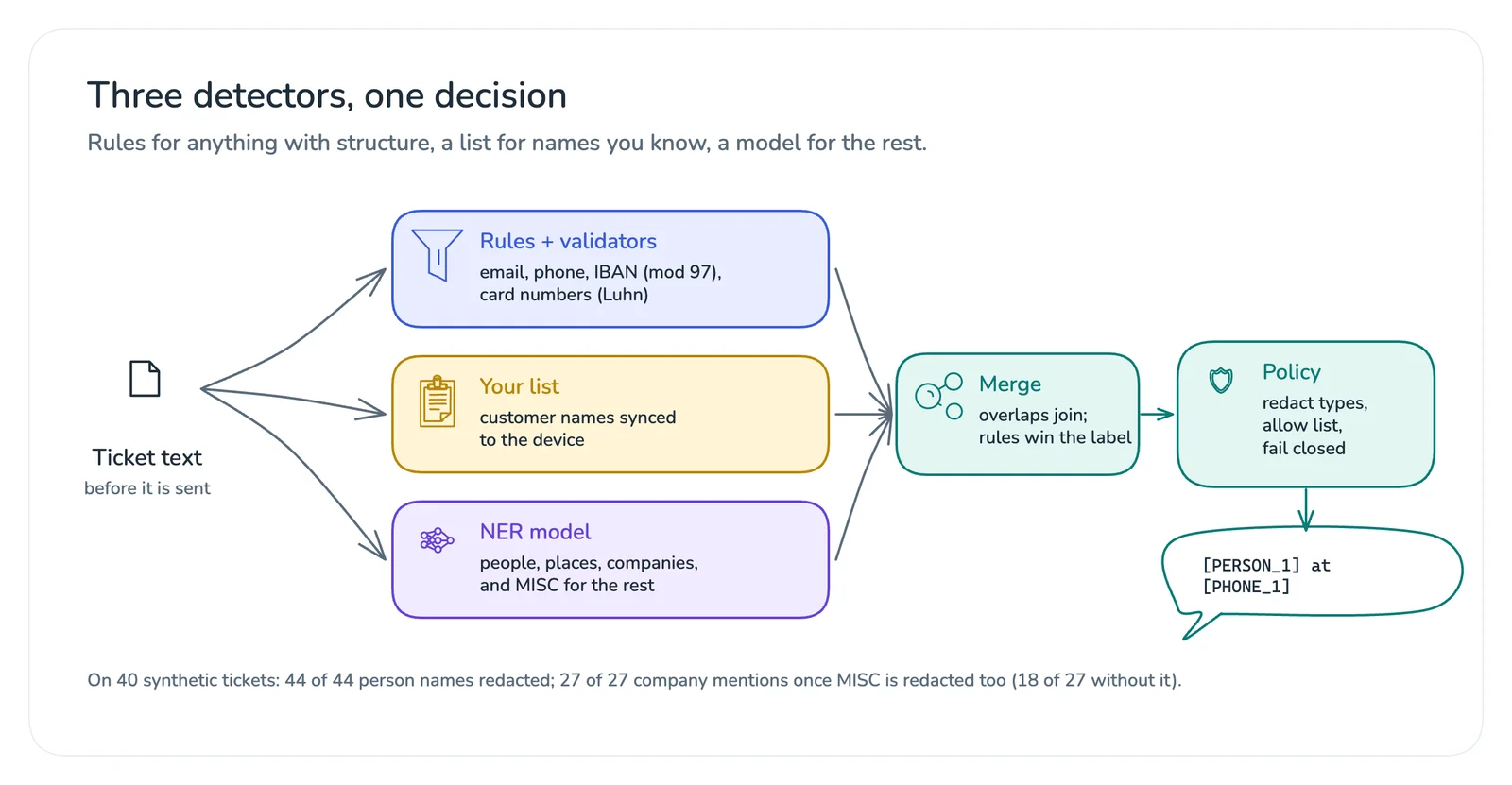
Rules with validators handle anything with structure. A regular expression alone over-matches, since plenty of 16-digit numbers aren’t cards, so every pattern gets a validator: the Luhn checksum for cards, the mod-97 check for IBANs, a digit count for phone numbers.
const luhn = (digits) => {
  let sum = 0;
  for (let i = 0; i < digits.length; i++) {
    let d = Number(digits[digits.length - 1 - i]);
    if (i % 2 === 1) d = d * 2 > 9 ? d * 2 - 9 : d * 2;
    sum += d;
  }
  return sum % 10 === 0;
};

export const STRUCTURED = [
  { type: 'EMAIL', re: /[A-Za-z0-9._%+-]+@[A-Za-z0-9-]+(?:\.[A-Za-z0-9-]+)*\.[A-Za-z]{2,}/g },
  { type: 'IBAN', re: /\b[A-Z]{2}\d{2}(?: ?[A-Z0-9]{4}){2,7}(?: ?[A-Z0-9]{1,4})?\b/g, valid: ibanOk },
  { type: 'CARD', re: /\b\d(?:[ -]?\d){12,18}\b/g, valid: (m) => luhn(m.replace(/\D/g, '')) },
  { type: 'PHONE', re: /\+?\(?\d{1,4}\)?(?:[ .-]?\d{2,4}){2,5}\b/g, valid: (m) => digitCount(m) >= 9 && digitCount(m) <= 15 },
];
In my tests these catch 4111 1111 1111 1111 and skip 4111 1111 1111 1112 (it fails Luhn), and they leave order numbers and dates alone.
A local list covers names you already know are sensitive, like your customers’ company names synced from the CRM. It’s a whole-word, case-insensitive match, and it’s the most reliable detector you’ll have for those names.
A named-entity recognition (NER) model catches everything without structure: people, places, and organizations. I used dslim/distilbert-NER, an Apache-2.0 DistilBERT model with 66 million parameters and nine labels (B- and I- tags for people, organizations, locations, and a catch-all called MISC). Why not a small generative model? Token classification is the right tool here: one forward pass, deterministic output, and a clean mapping from tokens back to character positions. A chatty model that rewrites the text is the last thing you want in a privacy filter.
Overlapping spans then merge into one, the rules get the final say on the label, and a policy decides which types to redact and which terms are always allowed (your own product names, for example).
One model, two runtimes
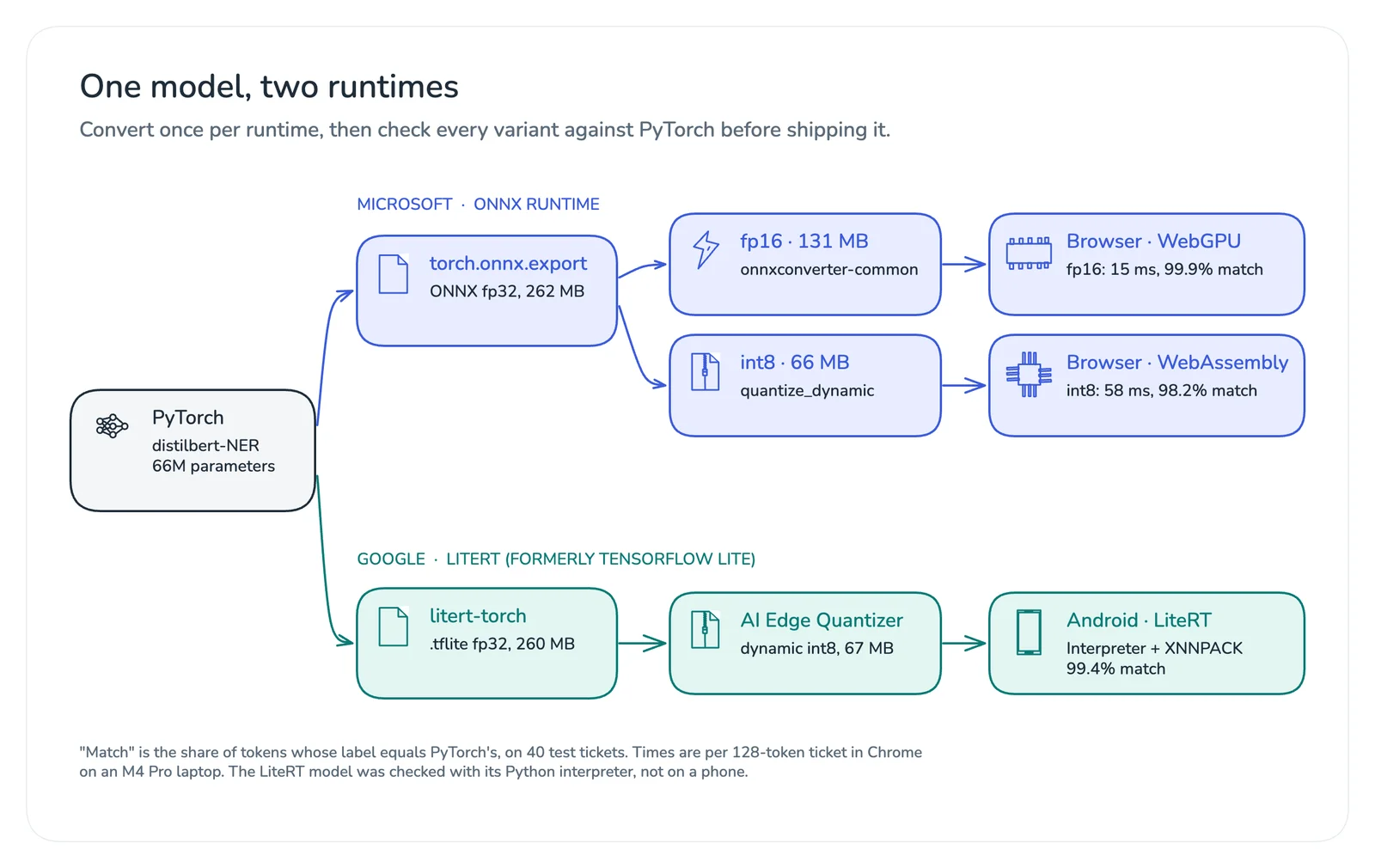
The same PyTorch checkpoint becomes four files: ONNX fp32, fp16 and int8 for the browser, and an int8 .tflite file for Android. The rule that saves you later is simple: every converted variant gets checked against PyTorch before it ships.
Hugging Face models return an output object, and exporters want plain tensors, so wrap the model first:
import torch
from transformers import AutoModelForTokenClassification

hf = AutoModelForTokenClassification.from_pretrained("dslim/distilbert-NER").eval()

class Logits(torch.nn.Module):
    def __init__(self, model):
        super().__init__()
        self.model = model

    def forward(self, input_ids, attention_mask):
        return self.model(input_ids=input_ids, attention_mask=attention_mask).logits

model = Logits(hf).eval()
ONNX. Export with the dynamo-based exporter and dynamic batch and sequence sizes. Then make an int8 copy with ONNX Runtime’s dynamic quantization, and an fp16 copy for the GPU:
from onnxruntime.quantization import QuantType, quantize_dynamic
from onnxconverter_common import float16
import onnx

batch, seq = torch.export.Dim("batch"), torch.export.Dim("seq", max=512)
torch.onnx.export(
    model, (ids, mask), "airlock-ner.onnx",
    input_names=["input_ids", "attention_mask"], output_names=["logits"],
    dynamic_shapes={"input_ids": {0: batch, 1: seq}, "attention_mask": {0: batch, 1: seq}},
    opset_version=18, dynamo=True,
)
quantize_dynamic("airlock-ner.onnx", "airlock-ner.int8.onnx", weight_type=QuantType.QInt8)
onnx.save(float16.convert_float_to_float16(onnx.load("airlock-ner.onnx"), keep_io_types=True),
          "airlock-ner.fp16.onnx")
LiteRT. Google’s litert-torch package (formerly ai-edge-torch) converts the PyTorch module straight to a .tflite file, and the AI Edge Quantizer applies dynamic int8 quantization to it:
import litert_torch
from ai_edge_quantizer import quantizer, recipe

litert_torch.convert(model, (ids, mask)).export("airlock-ner.tflite")

qt = quantizer.Quantizer("airlock-ner.tflite")
qt.load_quantization_recipe(recipe.dynamic_wi8_afp32())
qt.quantize().export_model("airlock-ner.int8.tflite", overwrite=True)
The quantizer reported the model going from 247.86 MiB to 63.43 MiB, 3.9 times smaller. Mobile runtimes prefer static shapes, so I converted with a fixed sequence length of 128 tokens. The converted model’s signature names its inputs args_0 and args_1 and its output output_0, which matters on Android later.
The parity check runs every variant over test text and counts how often each token gets the same label as in PyTorch. I used 40 synthetic support tickets with fictional names, companies, and contact details:
def agreement(run):
    same = total = 0
    for text in sentences:
        ids, mask = encode(text)
        ref = torch_logits(ids, mask).argmax(-1)
        got = run(ids, mask).argmax(-1)
        keep = mask.astype(bool)
        same += int((ref[keep] == got[keep]).sum())
        total += int(keep.sum())
    return same / total
Here’s what I measured with the native runtimes on an Apple M4 Pro laptop (ONNX Runtime 1.30, LiteRT 2.2, 128 tokens per ticket):
| Variant | Size | Same label as PyTorch | 1 thread | 4 threads |
|---|---|---|---|---|
| ONNX fp32 | 262 MB | 100% | 16.1 ms | 8.8 ms |
| ONNX int8 | 66 MB | 98.7% | 18.7 ms | 9.9 ms |
| LiteRT fp32 | 260 MB | 100% | 9.9 ms | 8.8 ms |
| LiteRT int8 | 67 MB | 99.4% | 9.4 ms | 6.3 ms |
Two things surprised me. First, int8 quantization made the ONNX model four times smaller but not faster on this CPU. Quantization is a download-size decision first; speed depends on the hardware and kernels. Second, token agreement hides what matters for redaction, so I compared whole entities too. Every person name came out identical in all three variants. The disagreements were all about where invented company names like “Fabrikam” and “Litware” begin and end, which brings us to tokenization.
From word pieces back to the original text
The model doesn’t see words. BERT’s WordPiece tokenizer splits rare words into pieces: Priya Raman becomes P ##riya Rama ##n, and Contoso becomes Con ##tos ##o. To redact text, every piece has to remember which characters it came from.
For the browser I wrote the tokenizer in JavaScript, carrying offsets through each step. The heart of it is BERT’s greedy longest-match search:
pieces(word) {
  const chars = [...word.text];
  const out = [];
  let start = 0;
  let offset = word.start;
  while (start < chars.length) {
    let end = chars.length;
    let found = null;
    while (start < end) {
      const sub = (start > 0 ? '##' : '') + chars.slice(start, end).join('');
      if (this.vocab.has(sub)) { found = sub; break; }
      end--;
    }
    if (!found) return [{ id: this.vocab.get('[UNK]'), start: word.start, end: word.end, word }];
    const length = chars.slice(start, end).join('').length;
    out.push({ id: this.vocab.get(found), start: offset, end: offset + length, word });
    offset += length;
    start = end;
  }
  return out;
}
The tokenizer is part of the model: if it disagrees with the one used in training by a single ID, the model sees different input. So a test compares the JavaScript output with the Python tokenizer’s on every test sentence, including names like São Paulo, Petrović, and Yılmaz. All 40 match exactly.
Then comes the decision that matters most for redaction. The model labels pieces, and it can label pieces of one word differently. Here’s real output from the int8 model:
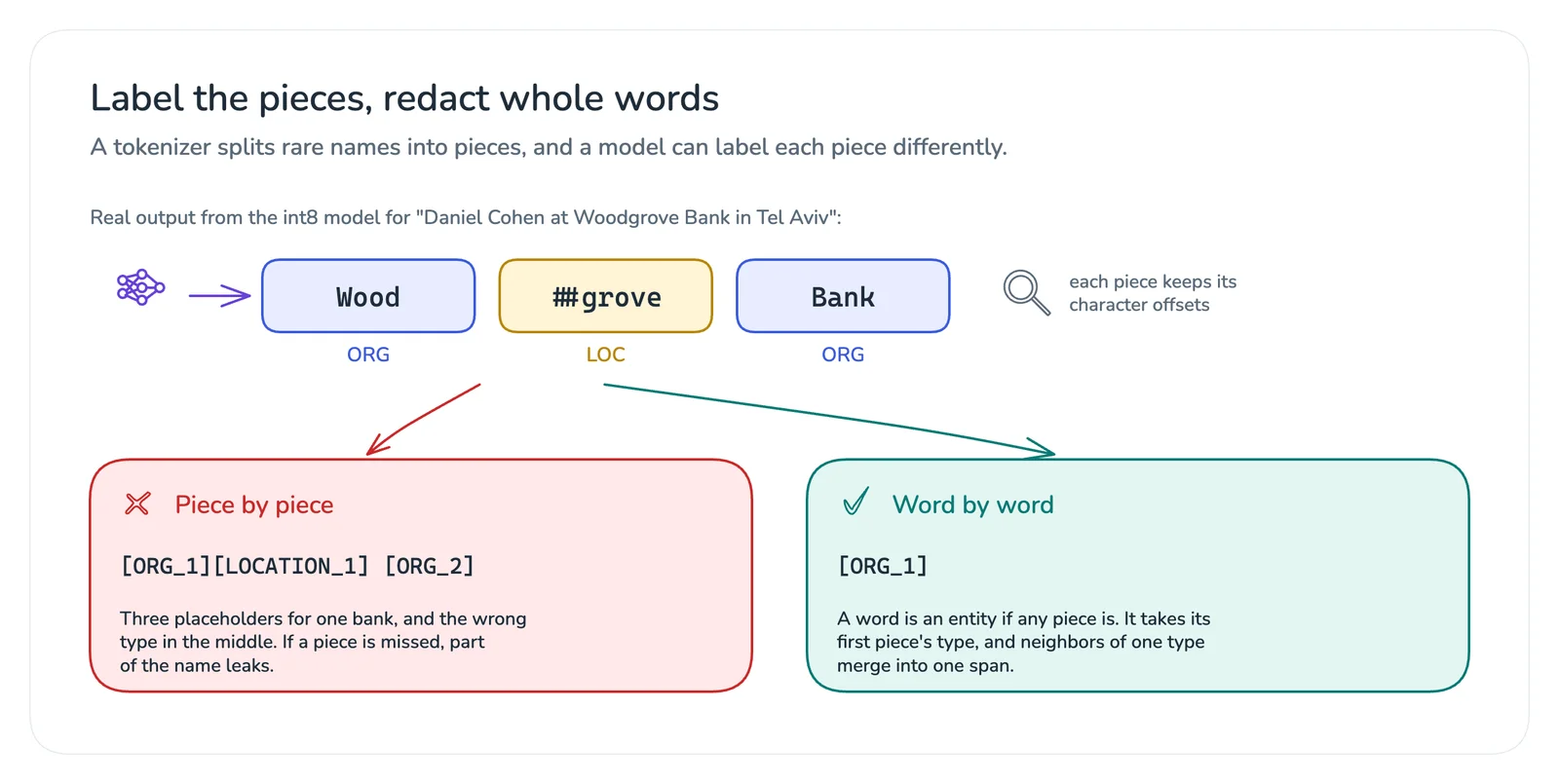
Building spans piece by piece produces [ORG_1][LOCATION_1] [ORG_2] for one bank. Worse, if the model ever labels a middle piece O, a fragment of the name leaks. For a privacy filter, coverage matters more than the label, so the airlock works at the word level:
for (const { word, labels: pieceLabels } of words) {
  const hit = pieceLabels.find((l) => l !== 'O');
  if (!hit) continue;
  const type = TYPE[hit.slice(2)];
  const prev = spans[spans.length - 1];
  if (prev && prev.type === type && /^\s?$/.test(text.slice(prev.end, word.start))) prev.end = word.end;
  else spans.push({ type, start: word.start, end: word.end });
}
Running it in the browser
The page keeps the vault and talks to the LLM. A dedicated worker does the heavy lifting: tokenizer, model, and decoding. It only ever sees text, never the vault or an API key.
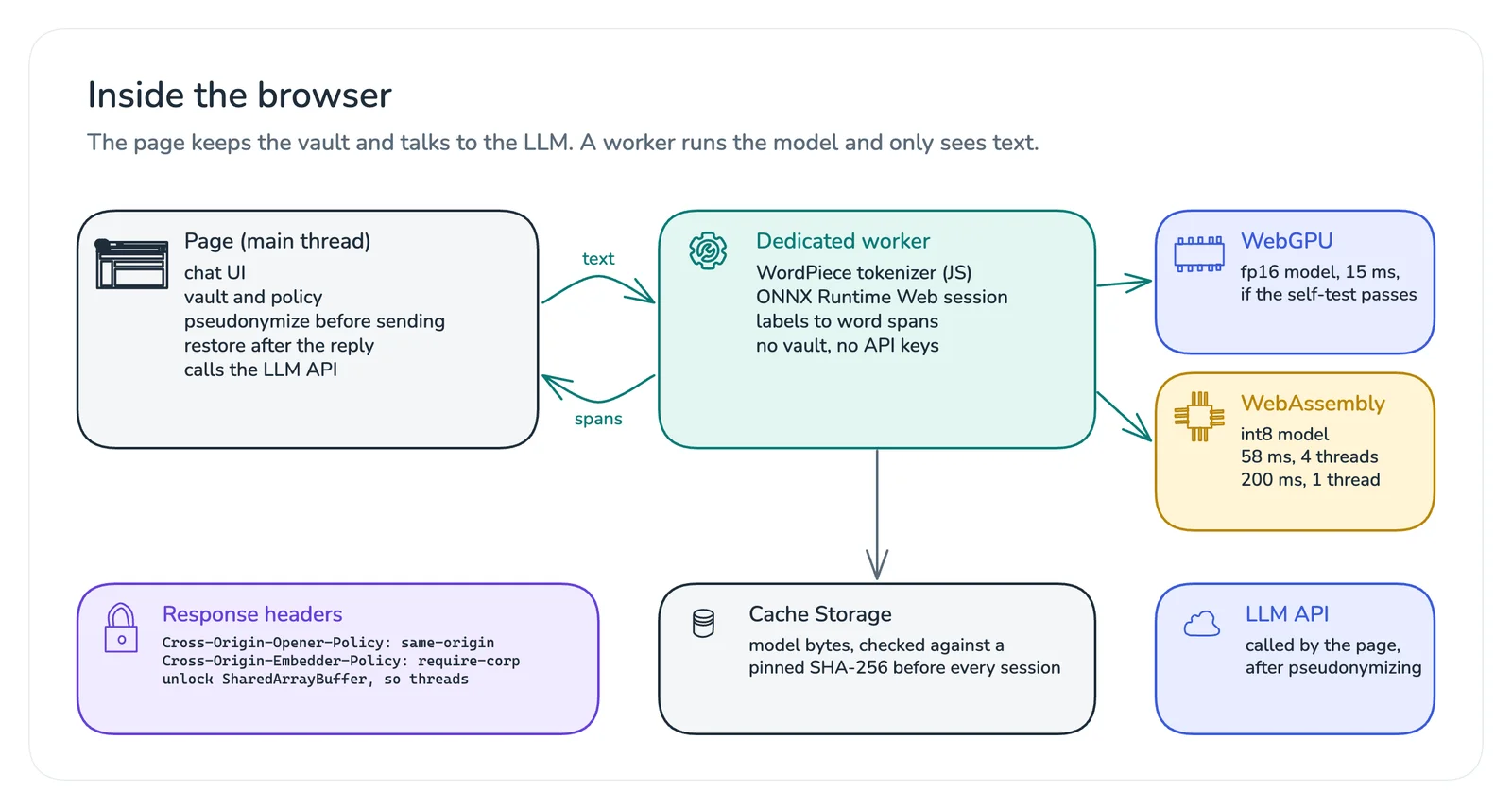
Three details matter here.
Pin the model. A model file is code that decides what leaks, so treat it like code. The worker caches the bytes in Cache Storage and checks a pinned SHA-256 before every session:
const toHex = (buf) => [...new Uint8Array(buf)].map((b) => b.toString(16).padStart(2, '0')).join('');

async function verifiedBytes(url, sha256) {
  const cache = await caches.open('airlock-models-v1');
  let response = await cache.match(url);
  if (!response) {
    response = await fetch(url);
    await cache.put(url, response.clone());
  }
  const bytes = new Uint8Array(await response.arrayBuffer());
  const digest = await crypto.subtle.digest('SHA-256', bytes);
  if (toHex(digest) !== sha256) {
    await cache.delete(url);
    throw new Error('model hash mismatch: refusing to run it');
  }
  return bytes;
}
Get threads. Multi-threaded WebAssembly needs SharedArrayBuffer, which browsers only enable on cross-origin isolated pages. That means two response headers:
Cross-Origin-Opener-Policy: same-origin
Cross-Origin-Embedder-Policy: require-corp
Isolation also restricts which cross-origin resources the page can embed, so decide it early. On my laptop it was the difference between 200 ms and 58 ms per ticket.
Choose the backend by testing it, not by asking for it. ONNX Runtime Web can run on WebAssembly or WebGPU. Here’s every combination I measured in Chrome 155 on the same laptop, with ONNX Runtime Web 1.30 and its real Metal GPU:
| Model | Backend | Per ticket | Same label as PyTorch |
|---|---|---|---|
| int8, 66 MB | WebAssembly, 1 thread | 200 ms | 98.2% |
| int8, 66 MB | WebAssembly, 4 threads | 58 ms | 98.2% |
| fp16, 131 MB | WebAssembly, 4 threads | 59 ms | 100% |
| fp32, 262 MB | WebAssembly, 4 threads | 56 ms | 100% |
| fp32, 262 MB | WebGPU | 17 ms | 100% |
| fp16, 131 MB | WebGPU | 15 ms | 99.9% |
| int8, 66 MB | WebGPU | 85 ms | 67.9% |
Look at the last row. The dynamically quantized model ran without a single error on WebGPU, and it was slower and wrong on about a third of its tokens. Nothing in the API tells you. This is a known class of problem: there are open reports about int8 models giving incorrect results on WebGPU, and about the DynamicQuantizeLinear and DequantizeLinear operators on that backend. My run reproduces it on 1.30.
The lesson goes beyond this bug: a backend can run your model successfully and still compute the wrong thing. So the worker runs a self-test at startup. It ships a few golden inputs with the labels PyTorch produced at export time, runs them on the chosen backend, and refuses a backend that disagrees:
async function selfTest(goldens) {
  let same = 0;
  let total = 0;
  for (const golden of goldens) {
    const { argmax } = await detect(golden.text);
    golden.labels.forEach((label, i) => {
      total++;
      if (argmax[i] === label) same++;
    });
  }
  return same / total;
}
On five golden tickets, the int8 model on WebGPU scored 72%, fp16 on WebGPU scored 100%, and int8 on WebAssembly scored 95%. The gap is wide enough for a simple threshold to tell them apart. My recommendation from these numbers: use fp16 on WebGPU when the device has it and the self-test passes, fall back to int8 on WebAssembly otherwise, and never trust a backend you haven’t tested.
The session itself is short:
import * as ort from 'onnxruntime-web/webgpu';

ort.env.wasm.numThreads = Math.min(4, navigator.hardwareConcurrency);
const session = await ort.InferenceSession.create(modelBytes, {
  executionProviders: ['webgpu'],
  graphOptimizationLevel: 'all',
});

const encoded = tokenizer.encode(text);
const { logits } = await session.run({
  input_ids: new ort.Tensor('int64', encoded.inputIds, [1, 128]),
  attention_mask: new ort.Tensor('int64', encoded.attentionMask, [1, 128]),
});
Running it on Android
On Android, the int8 .tflite file goes in the app’s assets, stored uncompressed so it can be memory-mapped:
// build.gradle.kts
dependencies {
    implementation("com.google.ai.edge.litert:litert:2.2.0")
}
android {
    androidResources { noCompress += "tflite" }
}
LiteRT 2.x adds a new CompiledModel API, but the classic Interpreter still ships in the same package, and its runSignature call maps neatly onto the signature names from the conversion step:
import android.content.Context
import java.io.FileInputStream
import java.nio.MappedByteBuffer
import java.nio.channels.FileChannel
import org.tensorflow.lite.Interpreter

class AirlockModel(context: Context) : AutoCloseable {
    private val interpreter = Interpreter(
        mapAsset(context, "airlock-ner.int8.tflite"),
        Interpreter.Options().setNumThreads(4),
    )

    // ids and mask come from the same WordPiece tokenizer, padded to 128.
    fun logits(ids: LongArray, mask: LongArray): Array<Array<FloatArray>> {
        val out = arrayOf(Array(128) { FloatArray(9) })
        interpreter.runSignature(
            mapOf("args_0" to arrayOf(ids), "args_1" to arrayOf(mask)),
            mapOf("output_0" to out),
        )
        return out
    }

    override fun close() = interpreter.close()
}

private fun mapAsset(context: Context, name: String): MappedByteBuffer =
    context.assets.openFd(name).use { fd ->
        FileInputStream(fd.fileDescriptor).channel.use { channel ->
            channel.map(FileChannel.MapMode.READ_ONLY, fd.startOffset, fd.declaredLength)
        }
    }
The tokenizer, word-level decoding, and placeholder logic port directly to Kotlin. Test the port against the same reference file the JavaScript version uses, and run the same golden self-test on the device. One honest caveat: I verified the .tflite model with LiteRT’s Python interpreter on my laptop, not on a phone, so measure latency on the devices your users actually have.
Placeholders and the vault
The placeholder logic is small, but two details make it work well with an LLM. The same value always gets the same placeholder within a conversation, so the model can still tell the customer from their colleague. And the vault never leaves the page:
export function pseudonymize(text, spans, vault) {
  let out = '';
  let cursor = 0;
  for (const s of spans) {
    const value = text.slice(s.start, s.end);
    const key = `${s.type}:${canonical(value)}`;
    let placeholder = vault.byKey.get(key);
    if (!placeholder) {
      vault.counts[s.type] = (vault.counts[s.type] ?? 0) + 1;
      placeholder = `[${s.type}_${vault.counts[s.type]}]`;
      vault.byKey.set(key, placeholder);
      vault.byPlaceholder.set(placeholder, value);
    }
    out += text.slice(cursor, s.start) + placeholder;
    cursor = s.end;
  }
  return out + text.slice(cursor);
}

export function rehydrate(text, vault) {
  return text.replace(/\[([A-Z]+)_(\d+)\]/g, (m) => vault.byPlaceholder.get(m) ?? m);
}
A line in the system prompt keeps the model cooperative: “Text in square brackets, like [PERSON_1], is a placeholder for private data. Copy placeholders exactly and never guess what they stand for.” If you need the vault to survive a reload, encrypt it with a non-extractable WebCrypto AES-GCM key (or the Android Keystore), and delete it with the conversation.
How well it works
On the 40 test tickets, running in the browser on the int8 model:
- All 44 person names were replaced.
- Emails and phone numbers were caught by the rules, and order numbers stayed readable.
- Company names were the weak spot. The generic model labels made-up brand names like “Fabrikam” and “Proseware” as
MISC, so a policy that redacts only people, places, and organizations caught 18 of 27 company mentions. AddingMISCto the policy caught all 27. The local customer list catches them too, without depending on the model. - It over-redacted once, turning “API” into an organization. An allow list fixes that.
- Labels were sometimes wrong (Contoso as a location, Northwind as a person), which barely matters: a wrong label still redacts.
Forty synthetic tickets is a smoke test, not a benchmark. Before relying on this, evaluate it on a labeled sample of your own data, and measure recall per entity type, because a missed name costs more than an extra placeholder.
Fail closed
A privacy feature is only as good as its worst failure mode. If the model can’t download, the hash doesn’t match, or every backend fails its self-test, the airlock should block sending or fall back to rules only, with a clear warning. Never send silently.
Two more things belong in the product. Show the user exactly what will be sent, with placeholders highlighted, and let them undo a redaction. And handle long text: the model reads 128 tokens at a time here, and the tokenizer reports when it truncates, so split longer text into overlapping windows and merge the spans.
Measuring it without reading prompts
You’ll want to know how the airlock behaves in the field, for example how often people undo a redaction, which signals false positives. Logging prompts would defeat the point. Randomized response, the oldest trick in local differential privacy, gives you the aggregate without the individual:
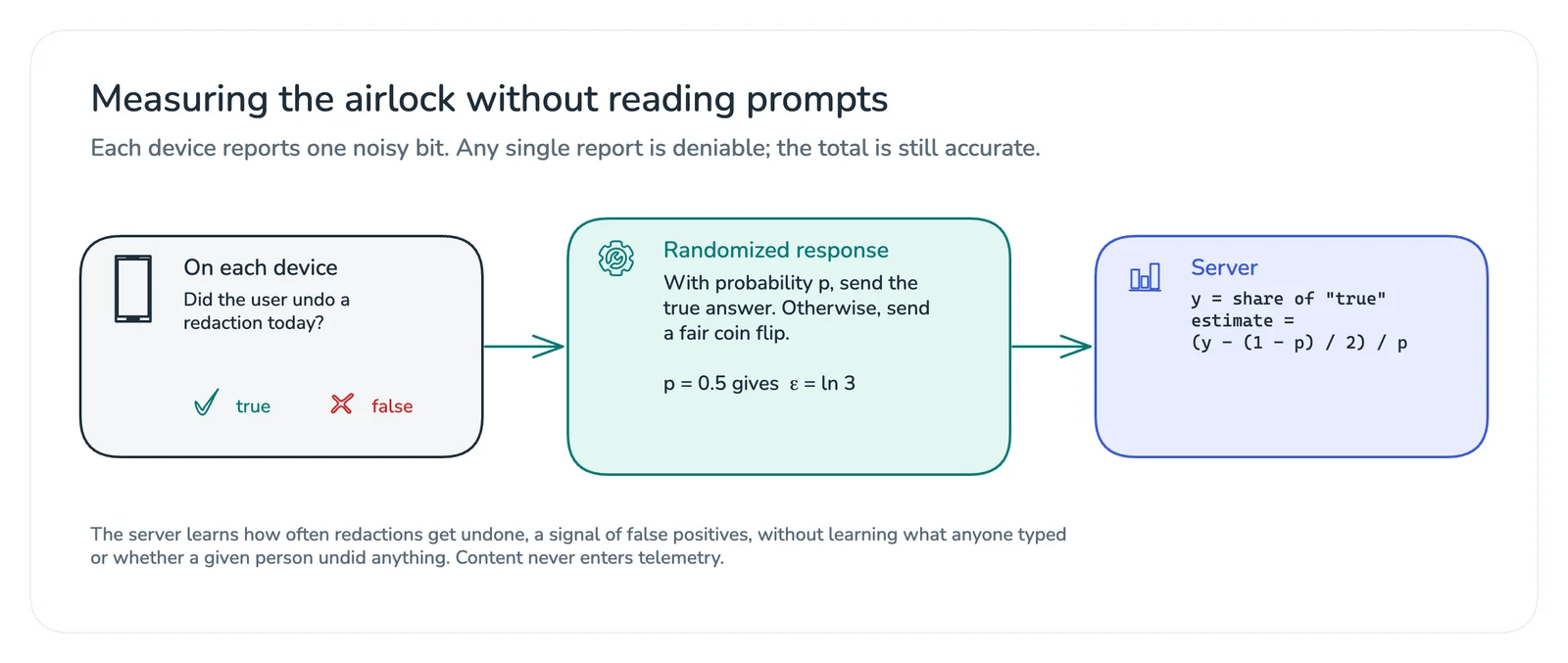
// On the device: report the truth with probability p, otherwise a coin flip.
const report = (truth, p = 0.5) => (Math.random() < p ? truth : Math.random() < 0.5);

// On the server: y is the share of true reports.
const estimate = (y, p = 0.5) => (y - (1 - p) / 2) / p;
With p = 0.5, a report of “true” is at most three times more likely when the truth is true than when it’s false, which gives ε = ln 3. You learn the rate across all users; you can’t learn what any one of them did, and no prompt text ever enters telemetry.
What I’d do next
The model is the biggest cost here: 131 MB for fp16 is a lot to download on a phone. Distilling it into a smaller model fine-tuned on your own domain would shrink it and add the labels a generic NER model lacks, like street addresses and account IDs. The open PII datasets on Hugging Face can help, but check their licenses first; several aren’t standard open licenses.
The pattern is the part I’d keep: detect on the device, replace with placeholders, keep the vault local, restore locally, test every backend, and fail closed. The cloud gets the context it needs to help, and nothing it doesn’t.
The full implementation, with the export scripts, the browser worker, the tests, and every number in this article, is at github.com/OmShiv/pii-airlock. If you build something like this, I’d like to hear what your parity checks catch.